
USDT and USDC may both aim to track the US dollar, but that does not make every swap route interchangeable. The receiving wallet may support only one token version, the network fee may change, and the quoted payout may differ. Start at the destination, match the exact token and network, compare live amounts, and test the route before sending the rest. You will finish with a route the recipient can actually credit.
Summary: Choose the destination-compatible token and network before comparing USDT with USDC. Match the exact network and contract, request both live quotes, and compare the final amount the recipient will get. Use a small test swap before increasing the amount, and save the order ID and TxID.
The useful question is not “Which stablecoin is better everywhere?” It is “Which complete route works for this recipient right now?” A route includes the token, its blockchain network, the sender’s withdrawal method, the exchange order, and the destination deposit screen.
Start at the destination – do not choose USDT or USDC first
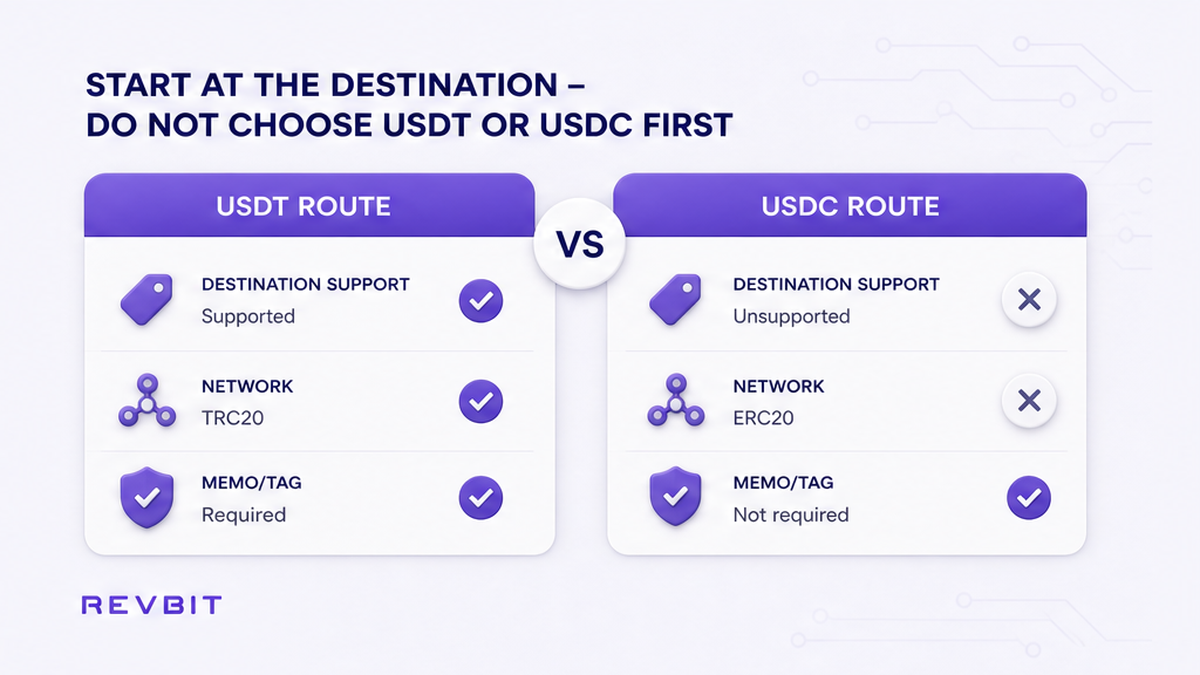
Open the receive or deposit screen in the wallet, exchange, payment service, or other destination that should get the funds. Select the asset there and write down the exact network shown beside it. If the screen asks for a memo or tag, record that too. A memo or destination tag is an extra account reference, similar to an apartment number in a large building.
Also read any minimum deposit notice on that screen. Do not assume that seeing “USDT” or “USDC” is enough. The same ticker can exist on several blockchains, and the destination may credit only the network it explicitly lists. Tether itself asks platforms to state which USDT protocols they support.
Work backward from these destination details. If the recipient supports USDC on one network but USDT only on another, compare those two executable routes. If it supports only one of them, the comparison is already settled unless you can safely change the destination.
Do: let the receiving screen define the eligible routes. Do not: buy or swap into a stablecoin first and look for a compatible deposit route afterward.
Match the exact network variant – do not rely on the ticker
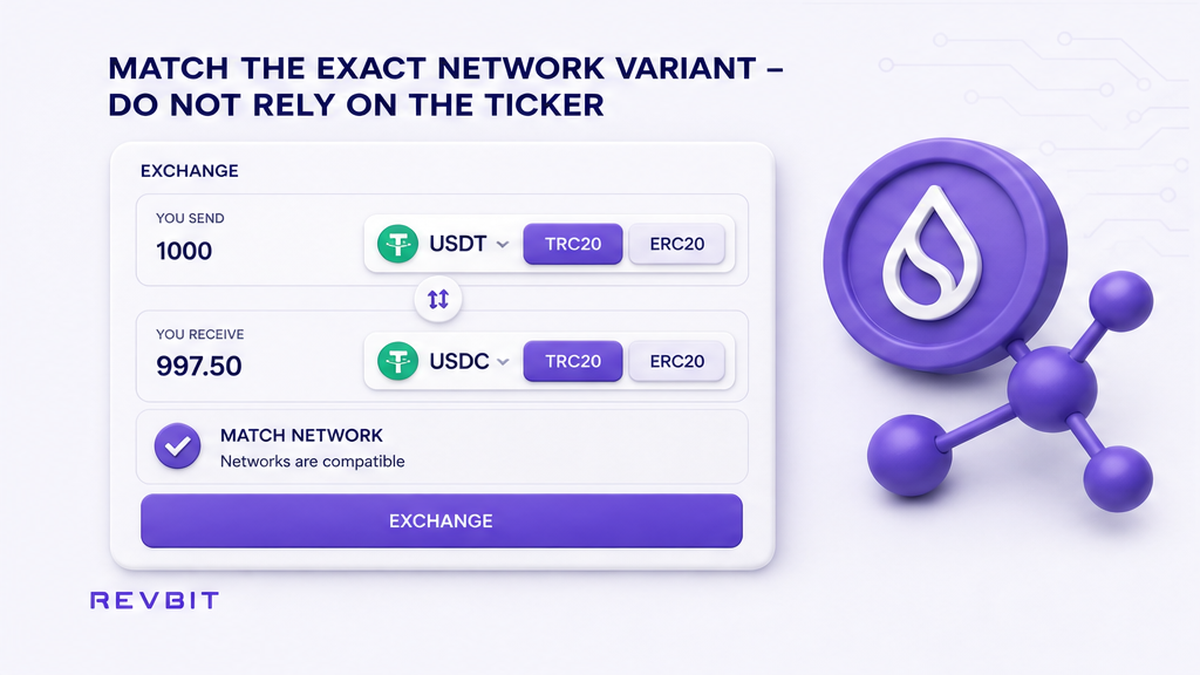
Next, open the instant exchange pair selector and check whether it offers the same asset on the same network. TRC-20 and ERC-20, for example, describe token standards on different blockchain rails. A familiar-looking address is not proof of a match, so compare the network labels directly.
On RevBit, the default receive network for USDT is TRC20. If your wallet requires ERC20, select ERC20 explicitly. This is a user-interface default, not a claim that TRC20 is universally cheaper or better. The correct choice is the one both the swap and the destination support.
| Check | USDT route | USDC route |
|---|---|---|
| Destination support | Keep only the listed USDT network | Keep only the listed USDC network |
| Exchange support | Confirm the same network in the order | Confirm the same network in the order |
| Token identity | Check the supported protocol when unclear | Check native or bridged status when unclear |
Do: match asset plus network on the send side, swap order, and receive side. Do not: send merely because the token symbol and address format look familiar. The network selection checklist gives a separate pre-send check when the labels are confusing.
Compare the final amount received – do not rank routes by one fee
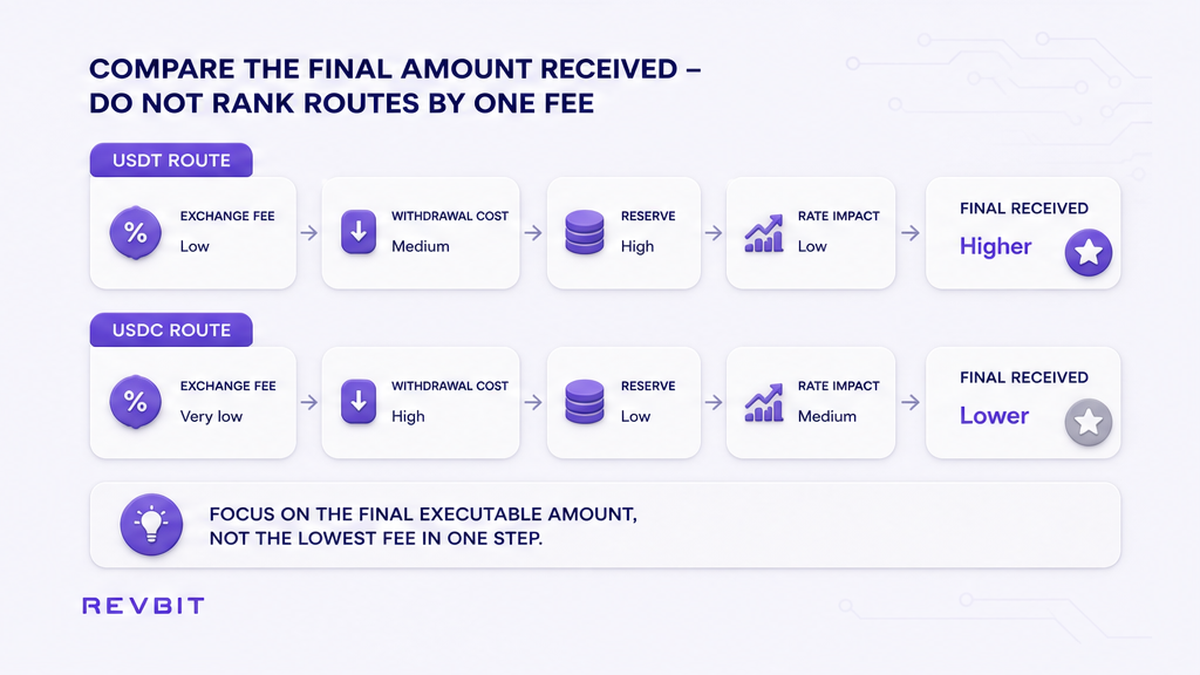
Request both live routes with the same starting asset and amount. Record the “you receive” value, fee line, order limits, and available reserve. Reserve is what the exchange can currently pay through that route. If it cannot cover the order, it is not a real option.
Add costs outside the quote. The sender may charge a withdrawal fee, while a blockchain transfer may require its native coin for gas, meaning the network’s processing charge. Compare what should actually arrive, not which page displays the smallest headline fee. Refresh stale quotes instead of mixing values captured at different moments.
Decision rule: Remove incompatible routes first. Then choose by the live final payout and your tolerance for rate movement, not by a claim that one token is always cheaper.
A stablecoin swap may not pay exactly one for one. Issuer backing or redemption language does not remove market price, spread, exchange fees, network fees, or withdrawal costs from an instant swap.
Do: compare two fresh, executable quotes and all visible costs. Do not: copy a fee range from an old comparison and treat it as the price of your current order.
Check reserve and rate mode – do not treat the first quote as a promise
A quote is useful only if the route has enough liquidity and reserve. Liquidity means enough trading activity and available funds for the conversion. Check the order limits, reserve, and warnings before pasting the final address.
Then choose between Fixed and Floating. A Fixed rate locks the quoted conversion for the stated window if you follow the order conditions. RevBit states a Fixed fee of 1% plus the network fee and a 12-minute lock. Use it when a predictable payout matters and you can send the exact amount within that window.
A Floating rate follows the market until the conversion finishes, so the final amount can differ from the first estimate. RevBit states a Floating fee of 0.5% plus the network fee. Use it only when you accept rate movement and the recipient does not require an exact credited amount.
Do: read the fee line and lock conditions in the live order. Do not: call a Floating estimate guaranteed or continue with an expired Fixed quote. The Fixed versus Floating rate guide explains the choice in more detail.
Verify an unfamiliar token contract – do not accept a bridged label blindly
Pause when you see an unfamiliar suffix, bridged version, or contract requirement. A contract address is the token’s unique identifier on one blockchain, like a product barcode tied to one store system.
Circle publishes a separate native USDC contract for each supported mainnet. “Native” means Circle issued that version directly on that network. A bridged token was moved through a bridge, which is a separate system that represents an asset on another chain. Similar names do not make native and bridged versions interchangeable.
Circle specifically warns that bridged USDC.e on X Layer is not issued or backed by Circle, unlike the native USDC contract it lists. The practical lesson applies whenever a suffix or bridge appears: copy the full contract from the issuer’s official page, open the correct blockchain explorer, and compare every character with the destination and swap listing.
Do: follow the full token contract verification workflow when the version is unfamiliar. Do not: proceed because a logo, ticker, or balance label looks close enough.
Run the complete test workflow – do not send the full amount first
Create a small order within the displayed limits. This test proves the route before more funds follow and can expose a wrong network, missing memo, unsupported version, or credit problem.
- Step 1: Record the destination asset, network, address, memo or tag, and minimum.
- Step 2: Keep only routes supported by both the destination and exchange.
- Step 3: Verify the contract for a native, bridged, or unfamiliar version.
- Step 4: Compare both live payouts, fees, limits, and reserves.
- Step 5: Add the sender’s withdrawal cost and required native gas.
- Step 6: Choose Fixed for certainty or Floating if movement is acceptable.
- Step 7: Recheck the address and memo, test, and save the order ID and TxID.
The order ID identifies the exchange order; the TxID is the blockchain receipt. Save both with the route details. Wait for the intended credit, and do not send again while the test is unclear. After credit, create a new order, refresh the quote, and repeat the address and network check.
When the route passes every check, open the RevBit swap widget and create the test order. Confirm the live fee line, rate type, receive network, and final amount before sending.
Do: scale up only after correct credit. Do not: treat an on-chain send as proof that the destination has credited it.
Frequently asked questions
Is USDT or USDC cheaper to swap?
Neither is always cheaper. Remove incompatible networks, request both routes for the same amount, and compare the live final payouts and outside costs.
Can I send USDT to a USDC address?
Do not rely on a similar address format. Send only the exact token and network listed by the destination and matched in the order.
Does the network matter more than the stablecoin?
Network compatibility is the first gate. Start with the receive screen and compare costs only among routes the destination can credit.
Why is a USDT to USDC swap not exactly one to one?
Issuer backing does not set an exchange payout. Check the live quote because price, spread, and exchange, network, and withdrawal costs affect it.
How do I check whether USDC is native or bridged?
Copy the network’s contract from Circle’s official list and compare it with the destination and order. Stop if it differs or lacks support.
Should I use a Fixed or Floating rate for the test?
Use Fixed when payout certainty matters and you can meet the lock. Use Floating only when you accept rate movement.