
You meant to send the exact “You send” amount, but your wallet broadcast more – or a second deposit landed on the same order address. Freeze further sends, prove the excess with the order quote versus the on-chain TxID, and open official support with a refund address you control. This crypto swap overpayment refund checklist keeps Fixed/Floating Terms straight and stops you guessing that surplus auto-swaps into a bigger payout.
Summary: If your deposit is above the quoted “You send” amount, stop sending to that disposable address. Compare the live order amount with the explorer TxID, separate overpay from underpay or wrong-network cases, and contact official RevBit support with order ID, TxIDs, and a refund address you control. Do not invent competitor UI buttons or a timed excess-refund SLA – use Terms 2.10 plus the 7-business-day claims and 6-hour disagreement windows.
Instant swaps quote a precise deposit. Wallets round fees, or someone “tops up” after a shortfall. Excess on the correct address is not underpay, a late Fixed send, or a wrong-network loss. Treat it as paperwork plus support – not another blind transfer. Run the steps below before you touch that deposit address again.
Confirm the quoted amount vs what left your wallet
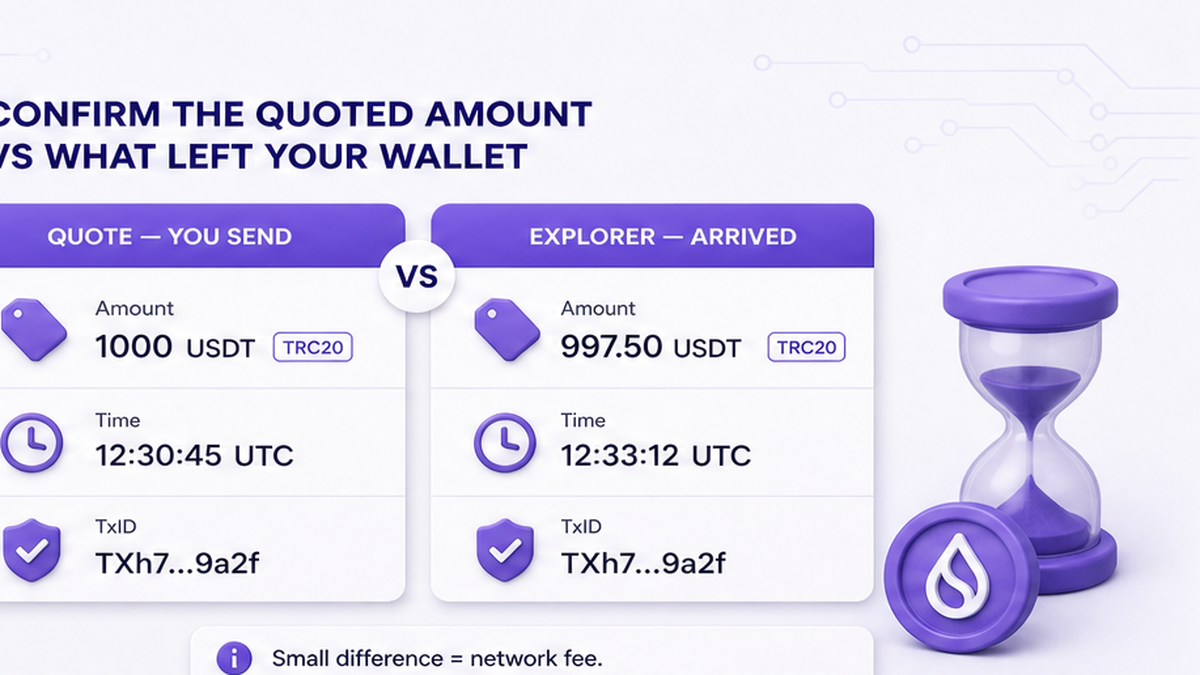
Put two numbers side by side. The order shows quoted You send, asset, and network (USDT on TRC-20 – Tron’s rail – versus ERC-20 on Ethereum). Your wallet shows what left; a block explorer (public confirmed transfers) shows what arrived.
- Copy order ID, You send amount, asset, network, and deposit address from the live order.
- Copy every TxID from the sending wallet (TxID = receipt hash of each broadcast).
- Paste each TxID into a same-network explorer and write the arrived amount.
- Subtract: explorer total minus quoted You send = candidate excess.
- Screenshot order + explorer rows; do not rely on memory.
Do: match network on explorer and order before you trust the amount. Don’t: send a “balancing” top-up while measuring – Terms 2.10 map several deposits to one address toward a refund minus applicable fees, not a cleaner quote.
Workflow: Live order quote → Wallet TxID(s) → Same-network explorer amount → Excess = arrived − quoted → Stop further sends → Support pack.
Separate overpay from underpay, late deposit, and wrong-network
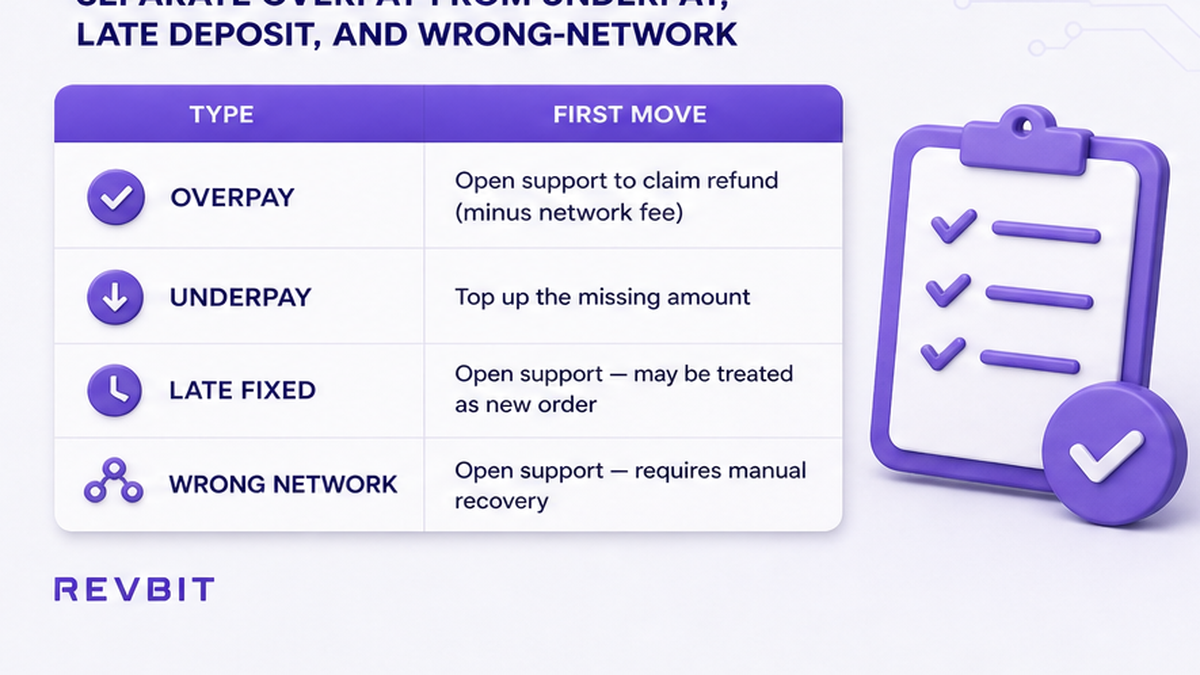
Wrong diagnosis wastes the claim window. Shortfalls belong to the sister underpaid guide. Late Fixed deposits and wrong chains follow other paths.
| What you see | Likely case | First move |
|---|---|---|
| Arrived > quoted You send on correct address/network | Overpay / excess | This checklist → official support |
| Arrived < quoted You send | Underpay / shortfall | Use the underpaid crypto swap refund checklist |
| Fixed send >10 minutes after confirm | Late Fixed deposit (Terms 2.10) | Expect recalculation at current rate – not an excess story |
| Different chain or missing memo/tag | Wrong-network / memo path | Terms 2.12 recovery is not an overpay fee schedule |
Fixed rate locks the receive amount for a short window when you confirm (RevBit Fixed: 1% + network, quote lock about 12 minutes). Floating is not locked the same way until funds arrive (0.5% + network). Neither label proves surplus enlarges your payout.
Do: classify with the table before you write support. Don’t: treat wrong-network loss as “overpay change.”
What happens to the excess under Fixed vs Floating (Terms 2.10)
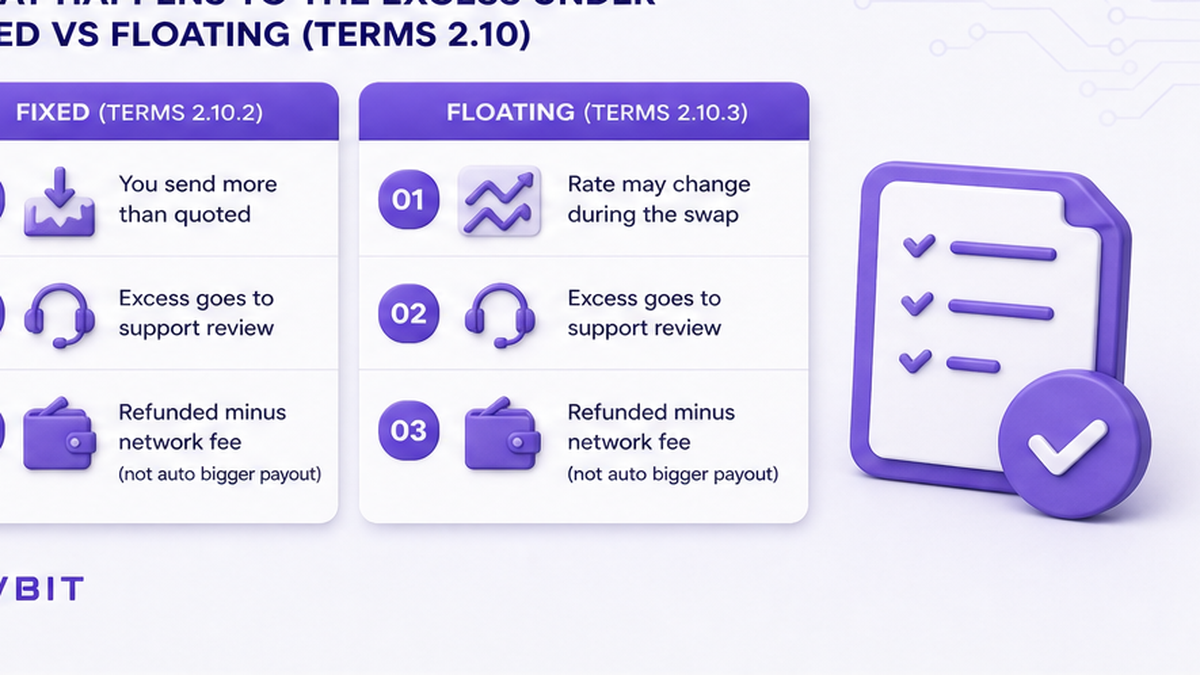
RevBit public Terms do not publish a dedicated “excess auto-refund in N hours” clock. For Fixed, if you send a different amount than displayed, or fees make the deposit too small, the exchange is made at the current rate at receipt (2.10). That is not a promise surplus auto-increases the locked receive amount. The live underpaid FAQ agrees: do not assume overpayment surplus auto-swaps into a bigger payout.
Several transactions to one application address → refund minus applicable fees. If an exchange can no longer complete, assets may return when possible less applicable fees; partner manual sends usually take up to 24 hours when that path applies. Credits taking more than 2 hours may add 0.5% of LP rate on return or exchange. Terms 6.3: once details are set and assets leave scope, you cannot casually cancel.
Competitors disagree on Fixed overpay (cancel+refund vs keep excess). Ask RevBit support what applies to your order – do not invent rival buttons like “Refund excess.”
Do: use only controls on the official order page. Don’t: assume Floating always swaps the full overpaid stack into a larger receive. Rate basics: Fixed vs Floating rate crypto swap. Clauses: RevBit Terms of Use.
Open official support with order ID, TxIDs, and a refund address you control
A crypto refund is not a card chargeback – it is a new outbound payment to an address you name. Bring a clean pack.
- Use on-site chat and/or email support@revbit.net (not marketing@revbit.net).
- Paste order ID, deposit address, Fixed or Floating mode, and timestamps.
- List every deposit TxID with quoted vs explorer amounts.
- Provide a refund address you control on the same asset and network as the deposit unless support says otherwise.
- Keep claims within 7 business days (Terms 2.11). For payment disagreement after completion, contact support within 6 hours (Terms 2.13).
- If support shares a refund TxID, verify amount, network, and destination on an explorer.
Start from RevBit support. Ignore DMs that offer to “unstuck” funds for a fee – official channels only (t.me/revbit, x.com/revbit_net).
Do: one structured ticket with full evidence. Don’t: reuse an old exchange deposit as your refund address, or invent a private excess-refund hour SLA.
Dust and network-fee floors: when tiny excess may not return
Tiny leftovers can cost more to move than they are worth. Industry examples (not RevBit floors): CoinGate notes excess may not return if refund value is below the network fee; Simplex describes excess refunds when overpay is worth at least about 10 EUR and the user confirms a controlled refund address.
Memo/tag recovery under Terms 2.12 (5% fee, minimum USD 20, only if amount > USD 30, review up to 14 days, refusal possible) is a different failure mode – do not paste that fee onto a simple overpay on the correct deposit address. If the order looks stuck rather than overpaid, use the stuck crypto swap order status checklist.
Do: ask support whether your excess clears any practical fee floor. Don’t: burn fees chasing dust or apply memo-recovery percentages to excess deposits.
Pre-send checklist so the next deposit matches the quote
Prevention beats a refund ticket:
- Fresh order from the live swap widget – never reuse an expired Fixed deposit address.
- Choose Fixed or Floating on purpose; Fixed locks about 12 minutes – broadcast inside that window.
- Account for wallet network fee so the arriving amount equals quoted You send.
- Send one transaction for the exact quoted amount; no multi-tx top-ups.
- Re-check asset and network (USDT TRC-20 vs ERC-20).
- Track the official order page until credit completes.
Do: practice fee math on a small send if the wallet UI confuses gross vs net. Don’t: stack corrective deposits hoping the quote “averages out.”
When clear to retry, open a new quote on the RevBit homepage swap widget and send only the printed You send figure. More how-tos: RevBit blog.
What to do next
- Stop any further sends to the current deposit address.
- Finish the quote-vs-explorer sheet and classify overpay vs other failures.
- Open official support with the full pack and a controlled refund address.
- Verify any refund TxID on an explorer.
- Eligible users outside restricted regions create the next swap only with one exact deposit from a fresh quote.
EU/EEA residents and other restricted regions cannot use the RevBit swap – check eligibility before a new order.
Frequently asked questions
Will the swap still complete if I overpaid?
It might still process under Terms 2.10, but do not assume surplus enlarges your locked receive amount. Stop further deposits, document quoted vs explorer amounts, and ask official support what applies to your order.
How long does an excess refund take on RevBit?
Terms do not publish a separate excess-refund hour SLA. Use claims within 7 business days (2.11), payment disagreement within 6 hours after completion (2.13), and – when a return path applies – partner manual sends usually up to 24 hours. Ask support for ticket status; ignore rival “48h” blogs.
Can I get the overpay back on a different network?
Ask support first. Default to a refund address you control on the same asset and network as the deposit unless they instruct otherwise. Wrong-network sends are a higher-risk path – not a free network upgrade.
I sent too much after an underpay – is that still excess?
Multiple deposits to one address can trigger Terms 2.10 multi-tx refund-minus-fees framing. Stop sending, list every TxID, and open support. Pure shortfalls without a second send belong on the underpaid checklist.
Does Fixed rate protect my overpayment automatically?
No. Fixed locks a quote for about 12 minutes (1% + network), but a different deposit amount follows 2.10 mismatch language – not a guaranteed bigger payout. Confirm mode, then contact support if explorer shows surplus.
Who do I email for an overpaid exchange order?
Tech claims go to support@revbit.net with complete evidence inside 7 business days (Terms 2.11). Do not use marketing@revbit.net. Prefer the official support page so chat and email stay tied to the same order ID.