
Wrong rate mode on a crypto swap wastes money or breaks the quote you thought you locked. This guide is about fixed vs floating rate crypto exchange on an instant swap widget – not central-bank FX pegs. You will see how RevBit Fixed (1% + network, 12-minute freeze) differs from Floating (0.5% + network), when each fits, and how to send so the order still settles.
Summary: Use Fixed when you need a known payout during a volatile window and can send the exact amount inside the lock. Use Floating when you accept market settlement for a lower service fee. On RevBit, Floating is recalculated only downward. Confirm the non-EU/EEA checkbox, pick network first, then toggle the rate mode before you send.
RevBit is a non-custodial instant crypto exchange: you create an order, send from your wallet, and receive to the address you enter. No deposit balance sits on the platform except during AML delays. Fees and timers below come from the Terms of Use – not pair-page marketing.
Open the swap widget only if you may use the service. EU/EEA users are not served; confirm you are outside those regions. If the checkbox does not apply, stop.
Confirm pair, network, and amount before the rate toggle
Set the asset you send, the asset you receive, and the blockchain network before you touch Floating or Fixed. A USDT address on the wrong network is a common permanent loss. For a practical flagship path, use XMR to USDT TRC20 and keep TRC20 explicit on the receive side.
Enter the receive address carefully. Double-check memo or destination tag coins if the widget asks for one. Only then choose the rate type. Changing the pair after you planned Fixed forces a new clock.
Freeze pair and network first. Treat Floating / Fixed as the last setting before confirm – not the first.
What a fixed rate crypto swap locks for 12 minutes
A fixed rate crypto swap freezes the quote so you can plan the payout. On RevBit the Fixed service fee is 1% plus the network fee. The rate stays frozen for 12 minutes – your send deadline, not a blockchain confirmation promise.
The lock is not absolute. If the market moves more than 1.3% before your transaction is detected, Fixed can void: you get a refund or continue at market rate. Sending more than 10 minutes after confirm also drops Fixed protection and recalculates at the current rate.
Important: start Fixed only when your wallet is unlocked and you can broadcast the exact amount immediately.
How a floating rate crypto swap prices the payout
A floating rate crypto swap uses a lower service fee – on RevBit 0.5% plus the network fee – and does not lock the final rate until funds are received and the exchange completes. You accept market settlement for cheaper service pricing.
RevBit Terms state Floating is recalculated only downward. The quote is not pushed upward after the floating order is live under that rule. You still wait for detection and completion; the preview is not a Fixed freeze.
Pick Floating when a short market move is fine and you want lower crypto swap fees. Pick Fixed when the receive amount must stay predictable for a handoff or invoice.
Fixed vs floating rate side-by-side comparison
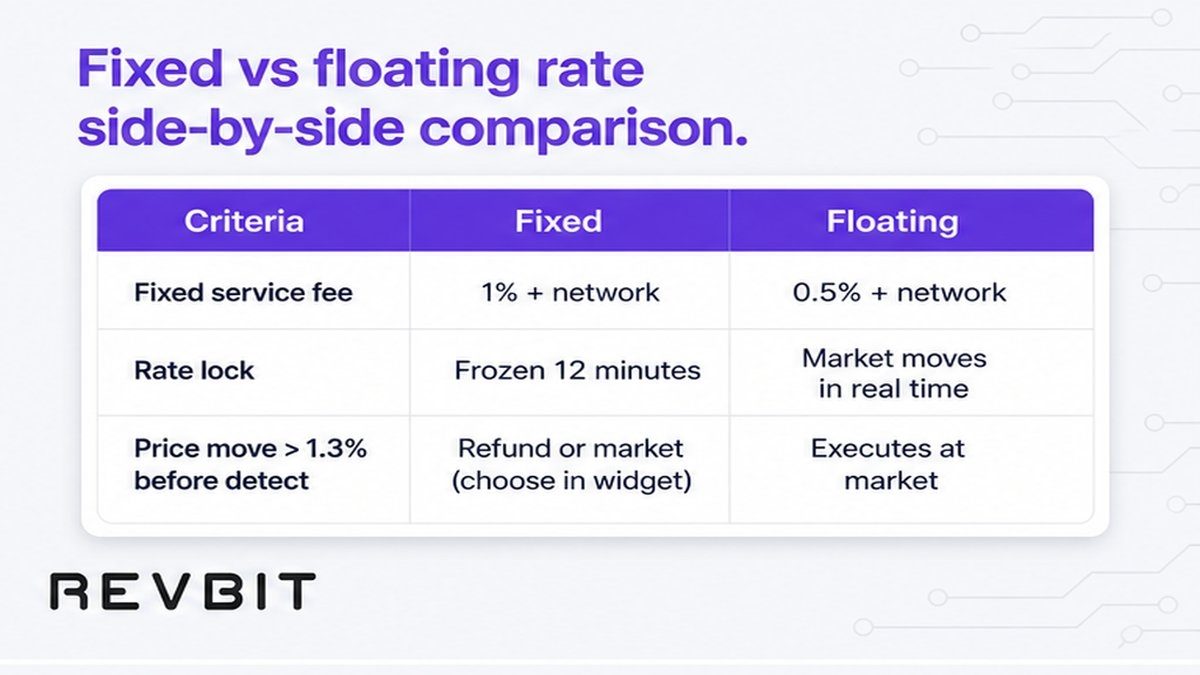
Use this fixed vs floating rate side-by-side comparison before you confirm. Details sit under the table.
| Criteria | Fixed | Floating |
|---|---|---|
| Service fee | 1% + network fee | 0.5% + network fee |
| Rate lock | Frozen 12 minutes | Not fixed until completion |
| When market moves | >1.3% before detect: refund or market | Settles at completion; only downward recalc |
| Late send | >10 min after confirm: current rate | No Fixed freeze to break |
| Best fit | Need known payout in a volatile window | Accept market settlement for lower fee |
Both modes still include a network fee on top of the service percent. Pair-landing copy that says “no extra fees” is weaker than the Terms – always read the fee line on the order screen and in Terms of Use.
Verdict: Choose Fixed for payout certainty you can defend with a timer. Choose Floating when fee savings matter more than a locked receive amount.
Stop Fixed failures before you broadcast
Most Fixed problems are send mistakes listed in Terms 2.10. Fix them before you leave the order page.
- Send the exact amount shown. If your wallet subtracts a withdrawal fee, top up so the deposit matches – a shortfall can force settlement at the current rate.
- Do not reuse a disposable deposit address from an old order. Each Fixed application gets a fresh address; recycling breaks the Fixed guarantee.
- Do not split the deposit into multiple transactions to one application address – that path tends toward refund minus applicable fees.
- Broadcast inside the send window. Waiting past 10 minutes after confirm recalculates at the current rate even if you meant Fixed.
If credits take more than two hours, Terms allow an extra 0.5% of LP rate on return or exchange. If nothing arrives, contact support@revbit.net within 7 business days – do not invent third-party accelerators.
Popular mistakes: reusing yesterday’s deposit address, sending after the timer, and ignoring network fees so the on-chain amount undershoots.
When to use fixed vs floating rates by size and volatility
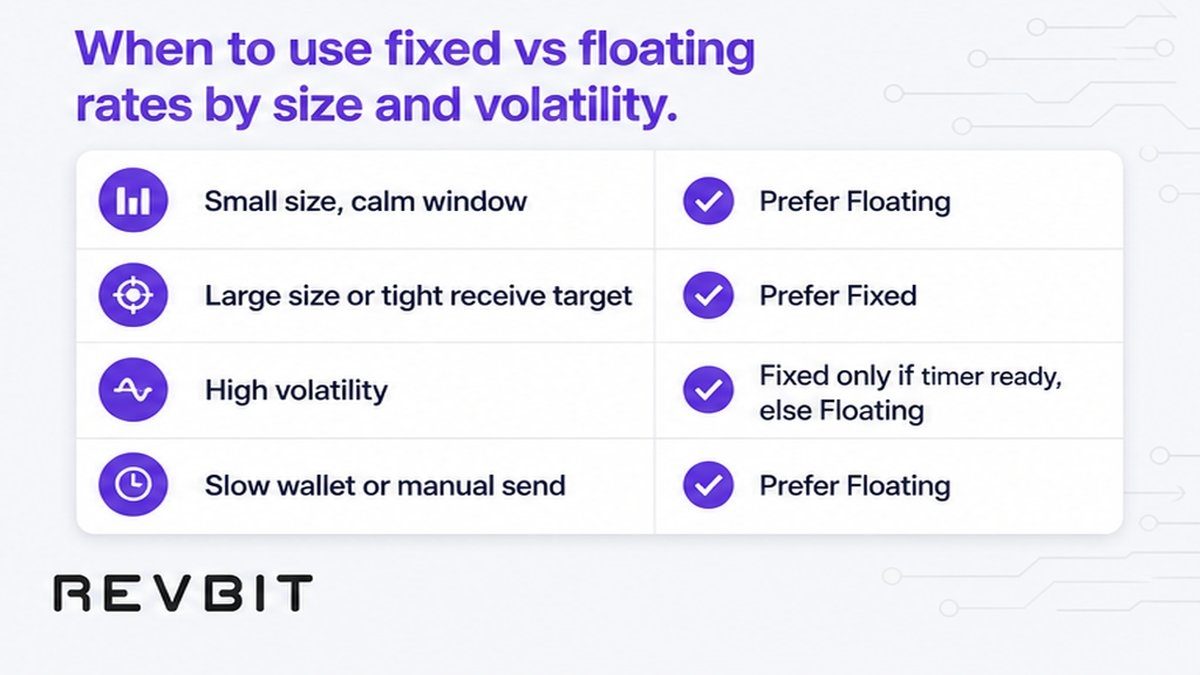
Decision rule for when to use fixed vs floating rates:
- Small, calm window: Floating is usually enough – you save on the service fee and a small move rarely hurts the goal.
- Large transfer or tight receive target: Fixed makes sense if you can send immediately and the 1% fee is acceptable for certainty.
- High volatility: Fixed helps only if you meet the timer and understand the >1.3% pre-detect path. If you cannot send fast, Floating may be cleaner than a broken Fixed order.
- Slow wallet or hardware confirmations: prefer Floating, or prepare the device before you start Fixed.
For related UI steps, use the same widget flow as a standard instant swap (pair, network, address, confirm). This page stays on the rate-mode choice.
Write down the receive amount you need. If a miss of a few percent breaks the plan, pay for Fixed and send on time. If the plan tolerates market settlement, keep Floating.
Complete the swap after you choose the rate mode
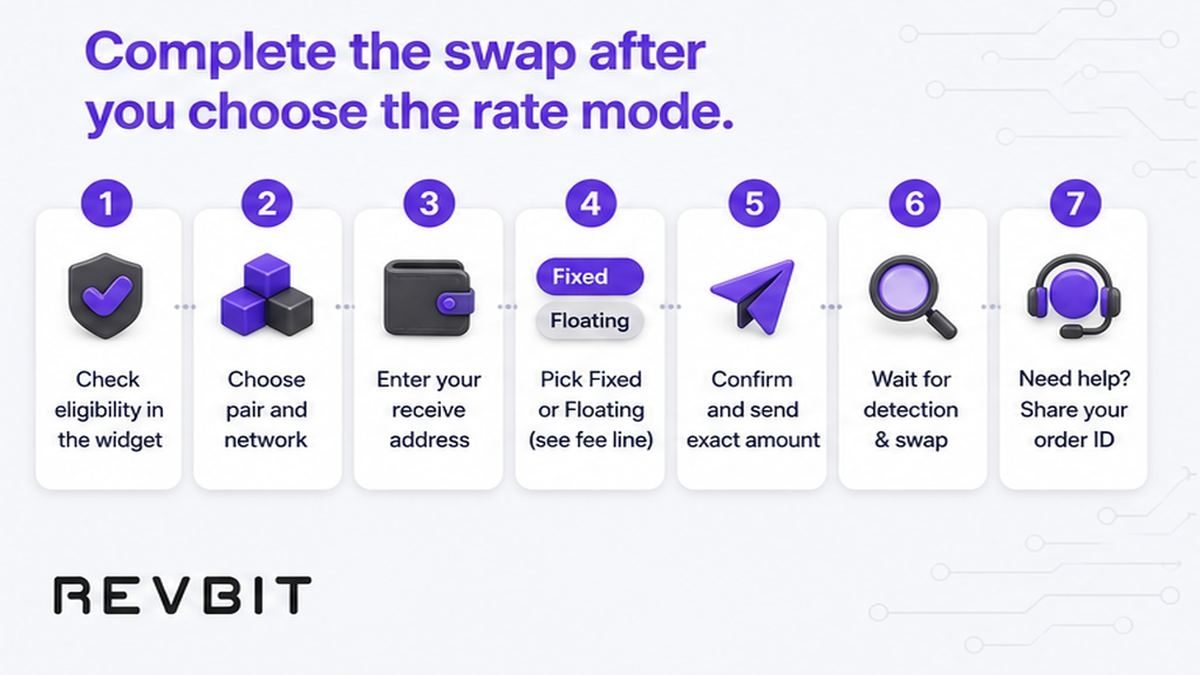
After Floating or Fixed is selected, finish the order with this sequence:
- Confirm you are outside EU/EEA and eligible under the service rules.
- Select send asset, receive asset, and the correct network on both sides.
- Enter the exact receive address (and memo/tag if required); verify the first and last characters.
- Toggle Floating or Fixed, read the fee line (0.5% or 1% plus network), and note the shown amounts.
- Click confirm, copy the fresh deposit address, and send the exact amount in one transaction from your wallet.
- Wait for detection and completion status; keep the order ID if you need support.
- If status stalls or amount mismatches, open on-site live chat with the order ID – do not resend to an old disposable address.
Optional before large sends: ask support for a free address pre-check. You will not get a detailed AML report. Do not use mixers or hide funds from screening – blocked sources are refused under policy.
Frequently asked questions
Which is better, fixed or floating rate on a crypto swap?
Neither is universally better. Choose Fixed when you need a known payout and can send the exact amount inside the lock. Choose Floating when you accept market settlement and want the lower 0.5% service fee.
When should I use a fixed rate crypto swap?
Use Fixed when volatility is high, the receive amount must match a target, and your wallet can broadcast immediately. Pay the 1% + network fee only if that certainty is worth it.
When should I use a floating rate crypto swap?
Use Floating for routine swaps where a small market move is fine. You pay 0.5% + network and wait for completion pricing; on RevBit, recalculation runs only downward under Terms 2.9.
Which rate type has lower fees on an instant swap?
Floating has the lower service fee (0.5% vs 1%). Both still add a network fee. Compare the full order line, not only the percent label.
What happens if the market moves during a fixed rate lock?
If the market moves more than 1.3% before your transaction is detected, Fixed can void: refund, or proceed at market rate. Smaller moves inside the rules keep the frozen quote while the 12-minute window holds.
How long is a fixed rate locked before I must send?
On RevBit the Fixed rate is frozen for 12 minutes. Sending more than 10 minutes after confirm recalculates at the current rate – treat that as a hard operational limit.
What if I send late, the wrong amount, or reuse a disposable address on fixed rate?
Late send or wrong amount can force current-rate settlement. A reused disposable address breaks the Fixed guarantee. Multiple deposits to one application address can lead to refund minus fees. Contact support with the order ID rather than sending again blindly.